
Nokia 3 Micro USB Charging Port Connector Socket Replacement
€3.10
For Nokia 3 Micro USB Charging Port Connector Socket available at OtusBargains.com. Great value with fast Irish dispatch from Ireland and a 30 day money back guarantee.
15 in stock
If your Nokia 3 is struggling to charge, disconnects when the cable moves, or won’t connect to a computer, the Micro USB socket may be worn, loose, or damaged. This replacement part is a Micro USB charging port connector socket designed to restore stable power input and reliable USB data connection.
Many charging issues start gradually: the phone charges only at an angle, the plug feels loose, or the battery percentage increases very slowly. Over time, repeated plugging/unplugging can weaken the connector, crack solder joints, or bend internal pins. Replacing the port is a common fix when cleaning the socket and trying different cables no longer helps.
Nokia 3 charging port fault symptoms
- Charging cuts in and out when the cable is touched or moved
- The Micro USB plug feels loose, wobbly, or does not click in firmly
- Slow charging even with a known-good adapter and cable
- Computer does not detect the phone for data transfer
- Charging icon appears briefly, then disappears
Micro USB charging socket replacement part details
- Part type: Micro USB connector socket (charging + data)
- Use: Repair a damaged USB port on the device
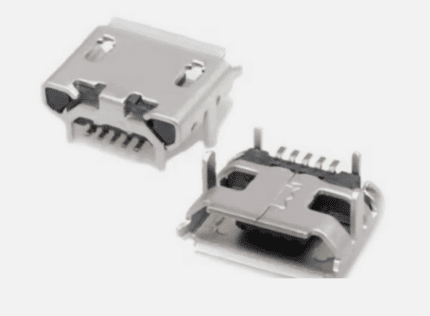
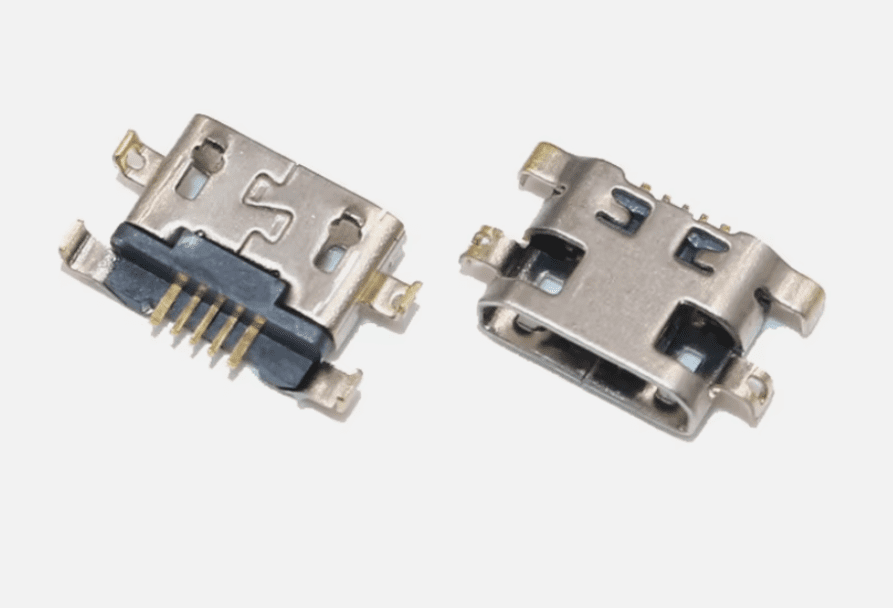
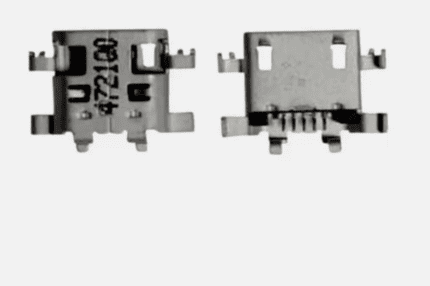
- Included: 1x connector socket (as pictured)
Compatibility and matching the correct Micro USB connector
Model: Nokia 3. Please compare your existing port with the listing images before ordering. Micro USB ports can look similar but may differ in pin layout, mounting legs, and body shape. Matching the connector style helps ensure a clean fit on your board and reduces installation issues.
Tip: If you’re unsure, remove the back cover and visually compare the metal housing, side legs, and the position of solder points on your original port. Getting the correct connector is just as important as soldering quality.
Diagnose the issue before replacing the charging socket
Before replacing the port, it’s worth doing a few quick checks. Sometimes the problem is a worn cable, debris in the socket, or a weak power adapter. These steps can save time and help confirm the USB port is actually the fault.
1) Try a known-good cable and adapter
- Test with another Micro USB cable that charges other devices reliably
- Use a different wall adapter (avoid weak laptop USB ports)
- Check if charging improves when using a higher-quality cable
2) Inspect and clean the Micro USB port carefully
- Power off the phone completely
- Use a bright light to check for lint or dust packed inside
- Clean gently using a wooden toothpick or plastic tool (avoid metal objects)
3) Check for physical looseness
If the socket moves when you insert the cable, or the connector looks tilted, that’s a strong sign the mounting points or solder joints have failed.
Installation notes (micro-soldering required)
This is a solder-in replacement part. Installation typically requires micro-soldering equipment and experience working with small components. If you are not comfortable with electronics repair, a local technician can fit the part for you.
Recommended tools for Nokia 3 USB port repair
- Soldering iron with a fine tip (or hot air station if preferred)
- Flux (helps create clean joints and reduces heat stress)
- Solder wick/braid for removing old solder
- Tweezers and plastic pry tools
- Isopropyl alcohol for cleaning flux residue
- Magnification (loupe or lamp) for pin inspection
Basic replacement overview
- Power off the device and disconnect the battery if possible
- Disassemble carefully to access the board and charging port area
- Apply flux and remove the old Micro USB socket (avoid lifting pads/tracks)
- Clean pads with wick and re-tin lightly
- Position the new connector socket and solder mounting legs first
- Solder the pins with minimal heat and plenty of flux
- Inspect for solder bridges and confirm solid joints
After-install checks for the Micro USB socket
Test charging and data connection before fully reassembling. This saves time if any adjustment is needed.
- Check the cable fit: it should feel firm and stable
- Confirm the phone shows charging consistently
- Test data sync by connecting to a computer (if supported)
- Watch for overheating near the port (a sign of a short)
Common questions about Nokia 3 charging port repair
Will this fix “charging slowly”?
It can, especially if the original port has worn pins or cracked solder joints. Slow charging can also be caused by a weak adapter, damaged cable, battery health issues, or charging circuitry problems.
My phone doesn’t charge at all — is the port always the cause?
Not always. A dead battery, damaged charging IC, broken tracks, or a damaged battery connector can also stop charging. If the port is visibly loose or damaged, replacing it is a sensible first step.
Does this part include a flex cable?
No — this listing is for the connector socket only (as pictured), intended to be soldered onto the board.
Why buy from OtusBargains
- Quality-checked replacement parts
- Fast dispatch from Ireland
- 30-Day Money-Back Guarantee for peace of mind
- Support if you need help matching the correct connector
Related products
https://www.ifixit.com/Wiki/Android_Charging_Port_Repair
Note: If your original port has lifted pads or damaged tracks, a standard replacement may not work without board repair (jumper wires or pad reconstruction). In that case, a technician can advise after inspection.
Keyword note: This listing is for the Nokia 3 charging port replacement (Micro USB socket connector) intended to restore normal charging and USB connection.
Related products

ALDI Medion LifeTab S10346 Micro USB Charging DC Port Connector Socket Replacement Part
CAT S50 Micro USB Charging Port Connector Socket Replacement
For Asus Zenfone 6 Camera Lens Cover

For Google Pixel 3 Camera Lens Cover

For Samsung Galaxy A70 Rear Camera Glass Lens